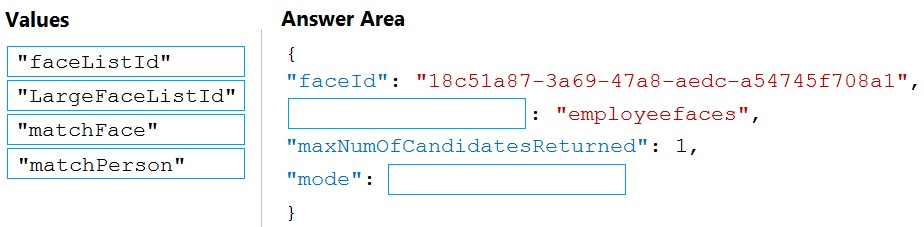
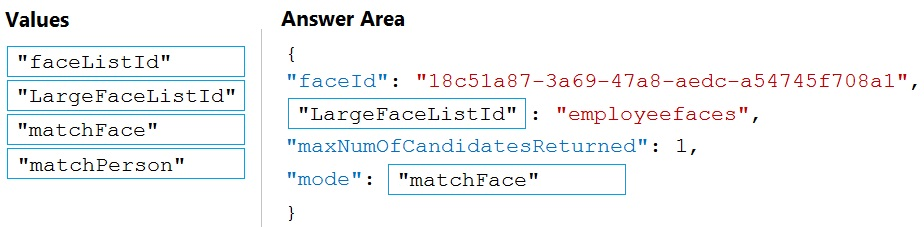
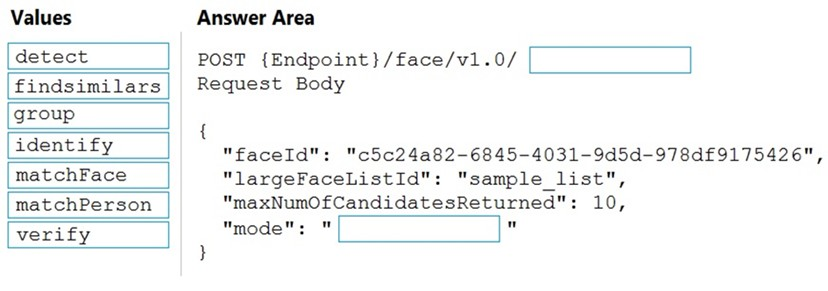
ボックス 1: LargeFaceListID -
LargeFaceList: 指定された大きな顔リストに顔を追加します (最大 1,000,000 の顔)。
注: クエリ顔の faceId を指定して、faceId 配列、顔リスト、または大きな顔リストから似た顔を検索します。 「faceListId」は、期限切れのないpersistedFaceIdsを含むFaceList - Createによって作成されます。また、LargeFaceList - Create によって「largeFaceListId」が作成され、これにも期限切れのないpersistedFaceIdsが含まれます。
不正解:
「faceListId」ではない: 指定した顔リストに顔を追加します (最大 1,000 個の顔)。
ボックス 2: マッチフェイス -
類似検索には、「matchperson」と「matchFace」という 2 つの動作モードがあります。 「matchperson」は、内部の同一人物しきい値を使用して、可能な限り同一人物の顔を検索しようとするデフォルトのモードです。知っている人の他の写真を見つけるのに便利です。内部しきい値を通過する顔がない場合は、空のリストが返されることに注意してください。 「matchFace」モードは、同一人物のしきい値を無視し、たとえ類似度が低くても、ランク付けされた似た顔を返します。有名人の顔を検索する場合などに使えます。
参照:
https://docs.microsoft.com/en-us/rest/api/faceapi/face/findsimilar
Box 1: LargeFaceListID -
LargeFaceList: Add a face to a specified large face list, up to 1,000,000 faces.
Note: Given query face's faceId, to search the similar-looking faces from a faceId array, a face list or a large face list. A "faceListId" is created by FaceList - Create containing persistedFaceIds that will not expire. And a "largeFaceListId" is created by LargeFaceList - Create containing persistedFaceIds that will also not expire.
Incorrect Answers:
Not "faceListId": Add a face to a specified face list, up to 1,000 faces.
Box 2: matchFace -
Find similar has two working modes, "matchPerson" and "matchFace". "matchPerson" is the default mode that it tries to find faces of the same person as possible by using internal same-person thresholds. It is useful to find a known person's other photos. Note that an empty list will be returned if no faces pass the internal thresholds. "matchFace" mode ignores same-person thresholds and returns ranked similar faces anyway, even the similarity is low. It can be used in the cases like searching celebrity-looking faces.
Reference:
https://docs.microsoft.com/en-us/rest/api/faceapi/face/findsimilar














コメント 1Comment 1
C. フォーム認識機能
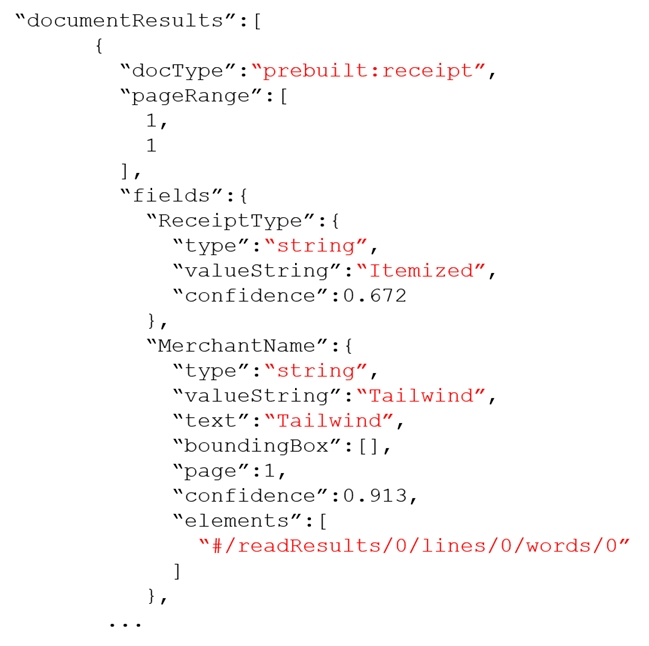
英語の領収書用に事前に構築された領収書モデルがあります。
抽出可能: ベンダー、合計、日付、品目、税金など。
超ローコード — 文字通り、PDF または画像をアップロードして API にアクセスするだけです。
領収書が標準的でない場合は、カスタマイズすることもできます。
— 最小限の開発労力、高精度、領収書用に設計されています。
C. Form Recognizer
Has a prebuilt receipt model for English receipts.
Can extract: vendor, total, date, items, tax, etc.
Super low-code — literally just upload a PDF or image and hit the API.
You can even customize it if your receipts are non-standard.
— minimal dev effort, high accuracy, designed for receipts.
コメント 2Comment 2
Form Recognizer は、フォームを理解する AI を活用したドキュメント抽出サービスで、印刷物か手書きかに関係なく、ドキュメントからテキスト、表、およびキーと値のペアを抽出できます。領収書やその他の種類のドキュメントから情報を認識して抽出するように設計されているため、このシナリオに最適です。仕入先や取引合計などのトップレベルの情報を領収書から簡単に抽出できるため、従業員が領収書を経費報告書に記録するのに費やす時間が削減されます。このソリューションは、一般的な抽出タスク用に事前構築されたモデルを提供するため、開発労力も最小限に抑えられます。
Form Recognizer is an AI-powered document extraction service that understands your forms, enabling you to extract text, tables, and key-value pairs from your documents, whether print or handwritten. It’s designed to recognize and extract information from receipts, among other types of documents, which makes it the best choice for this scenario. It can easily extract top-level information such as the vendor and transaction total from receipts, thereby reducing the time employees spend on logging receipts in expense reports. This solution also minimizes development effort as it provides pre-built models for common extraction tasks.
コメント 2.1Comment 2.1
他のオプションは適切ではありません。
• A. Custom Vision: このサービスは、カスタム画像分類モデルを構築するために使用されます。領収書を認識するために使用することはできますが、Form Recognizer のように領収書から詳細情報を抽出することはできません。
• B. Personalizer: パーソナライズされたユーザー エクスペリエンスを提供する AI サービスです。領収書を処理したり、文書から情報を抽出したりするように設計されていません。
• D. コンピューター ビジョン: このサービスは画像の視覚的特徴を分析できますが、フォームや領収書から構造化データを抽出することに特化したものではありません。 Form Recognizer と比較して、レシートから特定のフィールドを抽出するには大幅な追加開発が必要になります。
the other options are not suitable:
• A. Custom Vision: This service is used to build custom image classification models. It could be used to recognize receipts, but it wouldn’t extract the detailed information from them like Form Recognizer can.
• B. Personalizer: This is an AI service that delivers personalized user experiences. It’s not designed for processing receipts or extracting information from documents.
• D. Computer Vision: This service can analyze visual features in images, but it’s not specialized for extracting structured data from forms or receipts. It would require significant additional development to extract specific fields from a receipt compared to Form Recognizer.
コメント 3Comment 3
Form Recogniser は、領収書や請求書などの一般的なドキュメント タイプをサポートします。
Form recogniser supports among other common document types, receipts and invoices.
コメント 4Comment 4
OCR 対象のコンテンツを見つけるには Form Recognizer を使用することは間違いありません
no doubt using Form recognizer to locate the content to be OCR
コメント 5Comment 5
正解はC「Form Recognizer」です。このサービスは数週間前に名前を Document Intelligence に変更しました
The correct answer is C "Form Recognizer". This service had changed its name to Document Intelligence a few weeks ago
コメント 6Comment 6
Azure Form Recognizer を使用した請求書の例については、https://learn.microsoft.com/en-us/azure/applied-ai-services/form-recognizer/overview?view=form-recog-3.0.0#invoice を参照してください。
See example of Invoice with Azure Form Recognizer at https://learn.microsoft.com/en-us/azure/applied-ai-services/form-recognizer/overview?view=form-recog-3.0.0#invoice
コメント 7Comment 7
フォーム認識機能
Form recognizer
コメント 8Comment 8
C. フォーム認識機能
C. Form Recognizer
コメント 9Comment 9
Cが正解です。
C is correct answer.
コメント 10Comment 10
フォーム認識機能を使用する
Use Form recognizer