1. AI-102 トピック 1 問題 51. AI-102 Topic 1 Question 5
問題Question
ホットスポット -
感情分析と光学式文字認識 (OCR) を実行するために使用される新しいリソースを作成する必要があります。ソリューションは次の要件を満たす必要があります。
✑ 単一のキーとエンドポイントを使用して複数のサービスにアクセスします。
✑ 将来使用する可能性のあるサービスの請求を統合します。
✑ 将来的にはコンピューター ビジョンの使用をサポートします。
新しいリソースを作成するには、HTTP リクエストをどのように完了すればよいでしょうか?回答するには、回答領域で適切なオプションを選択してください。
注: 正しく選択するたびに 1 ポイントの価値があります。
ホットエリア: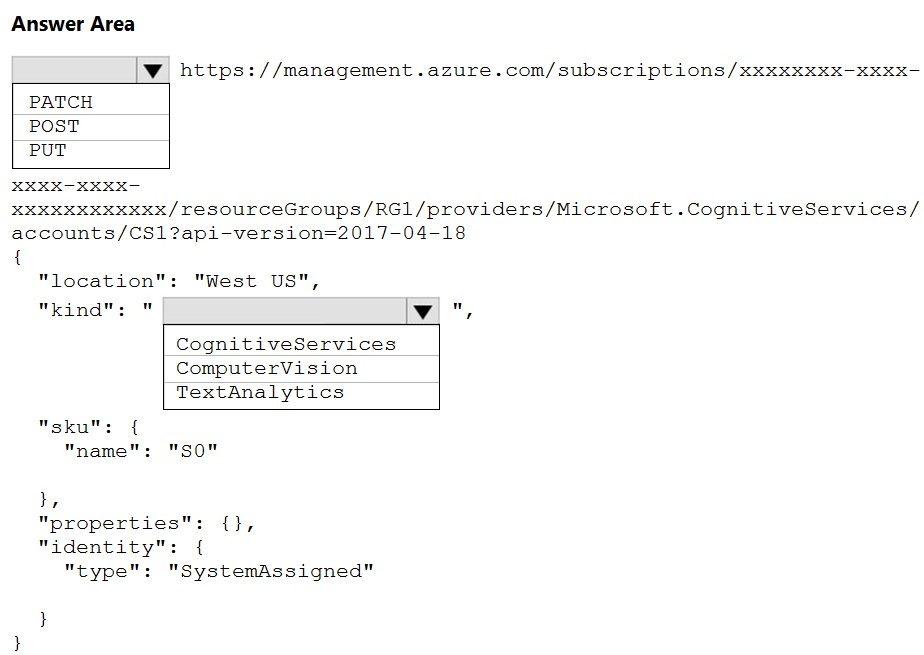
HOTSPOT -
You need to create a new resource that will be used to perform sentiment analysis and optical character recognition (OCR). The solution must meet the following requirements:
✑ Use a single key and endpoint to access multiple services.
✑ Consolidate billing for future services that you might use.
✑ Support the use of Computer Vision in the future.
How should you complete the HTTP request to create the new resource? To answer, select the appropriate options in the answer area.
NOTE: Each correct selection is worth one point.
Hot Area:
推奨解答Suggested Answer
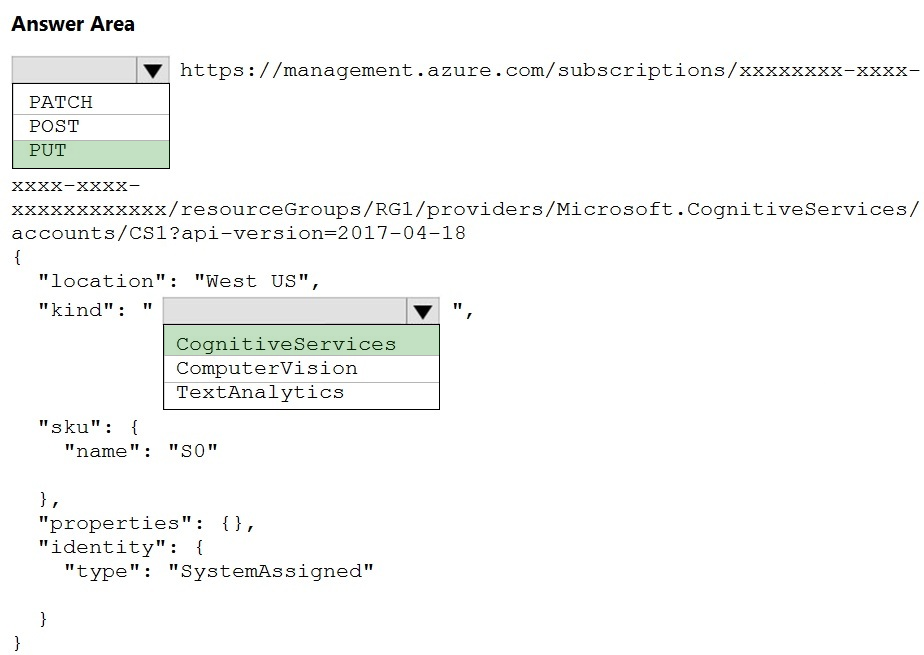
解答の説明Answer Description クリックして展開Click to expand
ボックス 1: 置く -
サンプル リクエスト: PUT https://management.azure.com/subscriptions/00000000-0000-0000-0000-000000000000/resourceGroups/test-rg/providers/
Microsoft.DeviceUpdate/accounts/contoso?api-version=2020-03-01-preview
不正解:
PATCHはアップデート用です。
ボックス 2: CognitiveServices -
Microsoft Azure Cognitive Services は、機械学習に関連するさまざまなビジネス上の問題に対して、事前トレーニングされたモデルを使用できるようにします。
さまざまなサービスのリストは次のとおりです。
✑ 決定
✑ 言語 (感情分析を含む)
✑ スピーチ
✑ 視覚 (OCR を含む)
✑ ウェブ検索
参照:
https://docs.microsoft.com/en-us/rest/api/deviceupdate/resourcemanager/accounts/create https://www.analyticsvidhya.com/blog/2020/12/microsoft-azure-cognitive-services-api-for-ai-development/
Box 1: PUT -
Sample Request: PUT https://management.azure.com/subscriptions/00000000-0000-0000-0000-000000000000/resourceGroups/test-rg/providers/
Microsoft.DeviceUpdate/accounts/contoso?api-version=2020-03-01-preview
Incorrect Answers:
PATCH is for updates.
Box 2: CognitiveServices -
Microsoft Azure Cognitive Services provide us to use its pre-trained models for various Business Problems related to Machine Learning.
List of Different Services are:
✑ Decision
✑ Language (includes sentiment analysis)
✑ Speech
✑ Vision (includes OCR)
✑ Web Search
Reference:
https://docs.microsoft.com/en-us/rest/api/deviceupdate/resourcemanager/accounts/create https://www.analyticsvidhya.com/blog/2020/12/microsoft-azure-cognitive-services-api-for-ai-development/


コメント 1Comment 1
答えは正しいと思います。
PUT: ファイルまたはリソースを特定の URI に、正確にその URI に配置します。
その URI にファイルまたはリソースがすでに存在する場合、PUT はそのファイルまたはリソースを置き換えます。
ファイルまたはリソースが存在しない場合は、PUT によってファイルまたはリソースが作成されます。
POST: POST は特定の URI にデータを送信し、その URI のリソースがリクエストを処理することを期待します。
I think answer is correct.
PUT: puts a file or resource at a specific URI, and exactly at that URI.
If there's already a file or resource at that URI, PUT replaces that file or resource.
If there is no file or resource there, PUT creates one.
POST: POST sends data to a specific URI and expects the resource at that URI to handle the request.
コメント 1.1Comment 1.1
それは正しいようです。リンクには同様の例が示されています
https://docs.microsoft.com/en-us/rest/api/deviceupdate/resourcemanager/accounts/create
It's seems correct, the link shows a similar example
https://docs.microsoft.com/en-us/rest/api/deviceupdate/resourcemanager/accounts/create
コメント 1.1.1Comment 1.1.1
はい、PUT https://management.azure.com/subscriptions/{subscriptionId}/resourceGroups/{resourceGroupName}/providers/Microsoft.CognitiveServices/accounts/{accountName}?api-version=2021-04-30
Yes, PUT https://management.azure.com/subscriptions/{subscriptionId}/resourceGroups/{resourceGroupName}/providers/Microsoft.CognitiveServices/accounts/{accountName}?api-version=2021-04-30
コメント 1.2Comment 1.2
リソースの識別: PUT 操作は、指定された URL によって識別されるリソースに対してのみ実行できます。 POST 操作は、URL に関係なく、任意のサーバー側リソースで実行できます。
使用例: PUT は、リソースの置換を完全に制御できるシナリオに適しています。 POST は、処理のためにデータを送信する必要があるシナリオ、または URI を指定せずに新しいリソースを作成する必要があるシナリオに適しています。
Resource identification: PUT operations can only operate on the resource identified by the URL provided. POST operations can be performed on any server-side resource, regardless of the URL.
Use cases: PUT is suitable for scenarios where you have full control over resource replacement. POST is suitable for scenarios where you need to submit data for processing, or create new resources without specifying a URI.
コメント 2Comment 2
Web プログラミングや API 開発では、PUT は更新操作のための http(s) リクエスト メソッドです。ただし、更新するリソースがない場合でもリソースを作成できます。正確な理由はわかりませんが、Azure が実際にリソースを作成するための REST API リクエストを行うために使用するメソッドは、実際には「PUT」です。したがって、答えは正しいです。
参照:
https://docs.microsoft.com/en-us/rest/api/resources/resources/create-or-update
Although in Web Programming, and API dev, PUT is an http(s) request method for an update operation. I can however create a resource when there is no resource to update. I don't know why precisely but the method used by Azure to actually make a REST API request to create a resource is actually "PUT". So, the answers are correct.
See Ref:
https://docs.microsoft.com/en-us/rest/api/resources/resources/create-or-update
コメント 3Comment 3
1. 置く
2. コグニティブサービス
1. PUT
2. CognitiveServices
コメント 4Comment 4
答えは
置く
認識サービス
なぜ置くのか?なぜなら、POST は PUT のような新しいリソースを作成することもできますが、PUT のように冪等ではないため、サービスを作成するときは常に PUT を使用する方が良いからです。
The answer is
PUT
congnitiveservices
Why PUT? Because while POST can also create new resources like PUT but its not idempotent like PUT hence its always better to us PUT when creating services.
コメント 5Comment 5
PUT と CognitiveServices
PUT and CognitiveSearvices
コメント 6Comment 6
Cognitive Services は人間の認知 (Cognitive) を模倣した「AI パーツ」であり、WebAPI としてすぐに利用できます。組み込みアプリケーションは、AI やデータ サイエンスの技術的な知識を必要とせずに、視覚、音声、言語、意思決定、検索のための認知ソリューションを構築できます。
Cognitive Services are "AI parts" that mimic human cognition (Cognitive) and are immediately available as WebAPI. Embedded applications can build cognitive solutions for vision, speech, language, decision making, and search without the need for technical knowledge in AI or data science.
コメント 7Comment 7
PUTが正しいかどうかについてChatGPTと意見が異なったとき、これが私が得たものです
Azure で新しいリソースを作成する場合、PUT メソッドを使用して、提供された構成でリソースを更新または作成します。 Azure Cognitive Services の場合、通常は PUT メソッドを使用して、指定した設定でサービスの新しいインスタンスをプロビジョニングします。
したがって、新しいリソースを作成するための正しい HTTP リクエストでは、POST ではなく PUT メソッドを使用する必要があります。
When i differed with ChatGPT about PUT being correct, this is what I got
When creating a new resource in Azure, the PUT method is used to update or create the resource with the provided configuration. In the case of Azure Cognitive Services, you typically use the PUT method to provision a new instance of the service with the specified settings.
Therefore, the correct HTTP request to create the new resource should use the PUT method, not POST.
コメント 8Comment 8
ChatGPT、PUT、およびコグニティブサービスからの回答
curl -X PUT -H "認可: Bearer {access_token}" -H "Content-Type: application/json" \
-d '{"種類":"TextAnalytics","sku":{"名前":"F0"}}' \
「https://management.azure.com/subscriptions/{subscription_id}/resourceGroups/{resource_group_name}/providers/Microsoft.CognitiveServices/accounts/{api_name}?api-version=2021-04-30」
Answer from ChatGPT, PUT and cognitiveservices
curl -X PUT -H "Authorization: Bearer {access_token}" -H "Content-Type: application/json" \
-d '{"kind":"TextAnalytics","sku":{"name":"F0"}}' \
"https://management.azure.com/subscriptions/{subscription_id}/resourceGroups/{resource_group_name}/providers/Microsoft.CognitiveServices/accounts/{api_name}?api-version=2021-04-30"
コメント 9Comment 9
与えられた答えは正しいです
The given answers are CORRECT
コメント 10Comment 10
PUTは正しいです。
https://learn.microsoft.com/en-us/rest/api/resources/resources/create-or-update
PUT is correct.
https://learn.microsoft.com/en-us/rest/api/resources/resources/create-or-update
コメント 11Comment 11
はい、入れます
https://learn.microsoft.com/en-us/rest/api/cognitiveservices/accountmanagement/accounts/create?tabs=HTTP
Yes, PUT
https://learn.microsoft.com/en-us/rest/api/cognitiveservices/accountmanagement/accounts/create?tabs=HTTP
コメント 11.1Comment 11.1
これは、コグニティブ サービス アカウントを作成するための正しいドキュメント リンクです。なぜ他のすべてのコメントが他のリソースを作成するためにそれらを引用するだけなのかわかりません。
This is the correct documentation link for creating cognitive services account. I don't know why all the other comments just quote those to create other resources.
コメント 12Comment 12
1. 置く
2. コグニティブサービス
1. PUT
2. CognitiveServices
コメント 13Comment 13
置く
コグナティブサービス
PUT
CognativeServices
コメント 14Comment 14
PATCH は削除されます (アップデートのみに使用されます)。 POST と PUT (リソースの作成) の両方を使用できると思います。ただし、PUT を使用すると良いでしょう (API が再トリガーされた場合に備えて、失敗することはありません)。
そして 2 番目の答えは、多くのモデルを提供する「コグニティブ サービス」です。 (したがって、コンピュータービジョンも使用できます)。コンピューター ビジョンのみを選択した場合、センチメント分析と OCR (リソースを作成しようとしている) は使用できません。
PATCH is eliminated (It is only used for update). I think we can use both POST and PUT (to create resources). But good to use PUT (just in case if API has been re-trigerred, So it will not fail.
And 2nd answer is "Cognitive services" which provides a lot of models. (So we can use computer vision as well). if we select only computer vision, then we can't use Sentiment analysis and OCR (for which we are trying to create a resource).
コメント 15Comment 15
PUT を使用する理由は、PUT リクエストが冪等である必要があるためと考えられます。クライアントが同じ PUT リクエストを複数回送信した場合、結果は常に同じになります (同じリソースが同じ値で変更されます)。 POST リクエストと PATCH リクエストは冪等であることが保証されていません。
May be the reason to use PUT is because , PUT requests must be idempotent. If a client submits the same PUT request multiple times, the results should always be the same (the same resource will be modified with the same values). POST and PATCH requests are not guaranteed to be idempotent.
コメント 16Comment 16
最初のものは POST ではないでしょうか?それは、既存のリソースが更新されたのではなく、作成された新しいリソースであると述べています。
Shouldn’t the first one be POST? It says it’s a new resource created, not an existing one updated.
コメント 16.1Comment 16.1
PUT はリソースの CREATE にも使用できます
PUT can also be used to CREATE resource
コメント 16.2Comment 16.2
新しいリソースを作成したい場合は、投稿が答えです。以下は別のサービスへのリンクですが、まだコグニティブ サービスの下にあります。 https://westus.dev.cognitive.microsoft.com/docs/services/speech-to-text-api-v3-0/operations/CopyModelToSubscription
I agree, post is the answer if we want create new resource, below is link for another services, but still under cognitive services. https://westus.dev.cognitive.microsoft.com/docs/services/speech-to-text-api-v3-0/operations/CopyModelToSubscription