1. AI-102 トピック 1 問題 11. AI-102 Topic 1 Question 1
問題Question
ドラッグドロップ -
それぞれ独自の言語理解モデルを持つ 100 個のチャットボットがあります。
多くの場合、同じフレーズを各モデルに追加する必要があります。
新しいフレーズを含めるように言語理解モデルをプログラムで更新する必要があります。
コードをどのように完成させるべきでしょうか?答えるには、適切な値を正しいターゲットにドラッグします。各値は 1 回使用することも、複数回使用することも、まったく使用しないこともできます。
コンテンツを表示するには、ペイン間で分割バーをドラッグするか、スクロールする必要がある場合があります。
注: 正しく選択するたびに 1 ポイントの価値があります。
選択して配置します: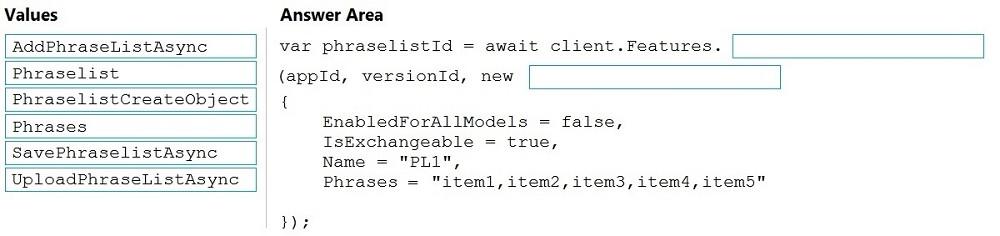
DRAG DROP -
You have 100 chatbots that each has its own Language Understanding model.
Frequently, you must add the same phrases to each model.
You need to programmatically update the Language Understanding models to include the new phrases.
How should you complete the code? To answer, drag the appropriate values to the correct targets. Each value may be used once, more than once, or not at all.
You may need to drag the split bar between panes or scroll to view content.
NOTE: Each correct selection is worth one point.
Select and Place:
推奨解答Suggested Answer
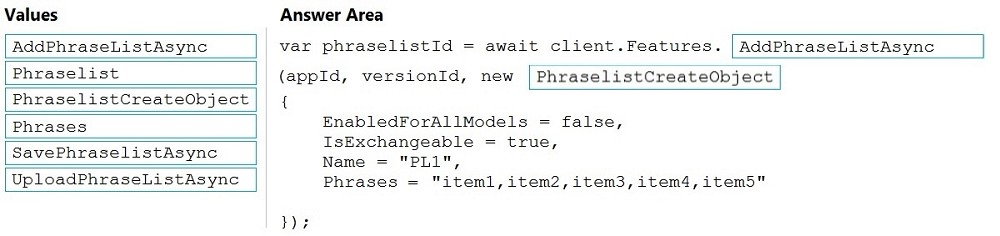
解答の説明Answer Description クリックして展開Click to expand
ボックス 1: AddPhraseListAsync -
例: フレーズリスト機能を追加する -
varphraselistId = await client.FEatures.AddPhraseListAsync(appId, versionId, new PhraselistCreateObject
{
EnabledForAllModels = false、
IsExchangeable = true、
名前 = "数量フレーズリスト",
フレーズ = 「少ない、多い、余分」
});
ボックス 2: PhraselistCreateObject -
参照:
https://docs.microsoft.com/en-us/azure/cognitive-services/luis/client-libraries-rest-api
Box 1: AddPhraseListAsync -
Example: Add phraselist feature -
var phraselistId = await client.Features.AddPhraseListAsync(appId, versionId, new PhraselistCreateObject
{
EnabledForAllModels = false,
IsExchangeable = true,
Name = "QuantityPhraselist",
Phrases = "few,more,extra"
});
Box 2: PhraselistCreateObject -
Reference:
https://docs.microsoft.com/en-us/azure/cognitive-services/luis/client-libraries-rest-api






















コメント 1Comment 1
ボックス 1: AddPhraseListAsync
ボックス 2: PhraselistCreateObject
varphraselistId = await client.FEatures.AddPhraseListAsync(appId, versionId, new PhraselistCreateObject
{
EnabledForAllModels = false、
IsExchangeable = true、
名前 = "数量フレーズリスト",
フレーズ = 「少ない、多い、余分」
});
マッピング :
モデル - エンティティ - 非同期
機能 - フレーズリスト - 非同期
Box 1: AddPhraseListAsync
Box 2: PhraselistCreateObject
var phraselistId = await client.Features.AddPhraseListAsync(appId, versionId, new PhraselistCreateObject
{
EnabledForAllModels = false,
IsExchangeable = true,
Name = "QuantityPhraselist",
Phrases = "few,more,extra"
});
Mapping :
Model - Entity - Async
Feature - PhraseList - Async
コメント 2Comment 2
(ソリューション自体の) 提供されたリンクに従って「C」に投票します。ただし、消去法を使用する方が良いでしょう。
フレーズを追加したいので、最も適切な関数名は、AddPhraseListAsync (他のすべてのオプションのうち) です。
さて、引数については、オプション (Phrases (本体ですでに渡されているため、関数本体でフレーズを手動で渡しているため、SavePhrases と UploadPhrases も削除されます) を参照すると、残りの 2 つのオプション、つまり PhraseList と PhraseListCreateObject が残ります。ここで C# コードでは、オブジェクトのインスタンス化に使用される "new" キーワードを使用しているため、"PhraseListCreateObject" の方が適切です。
Vote for 'C' as per the provided Link (in Solution itself). But Better go with elimination method.
We want to add the Phrases, So most suitable function name is : AddPhraseListAsync (out of all other options)
Now, for an argument, If we look options (Phrases (it's already passed in body, SavePhrases and UploadPhrases will also get eliminated, because we are manually passing the phrases with in function body). So 2 options left i.e. PhraseList and PhraseListCreateObject, Here in C# code, we are using "new" keyword which is used to instance the object, So "PhraseListCreateObject" more suitable.
コメント 3Comment 3
正解です。参照 https://learn.microsoft.com/en-us/dotnet/api/microsoft.azure.cognitiveservices. language.luis.authoring.featuresextensions.addphraselistasync?view=azure-dotnet
Correct Answer. Ref https://learn.microsoft.com/en-us/dotnet/api/microsoft.azure.cognitiveservices.language.luis.authoring.featuresextensions.addphraselistasync?view=azure-dotnet
コメント 4Comment 4
ボックス 1: AddPhraseListAsync
ボックス 2: PhraselistCreateObject
Box 1: AddPhraseListAsync
Box 2: PhraselistCreateObject
コメント 5Comment 5
// フレーズリスト機能を追加
varphraselistId = await client.FEatures.AddPhraseListAsync(appId, versionId, new PhraselistCreateObject
{
EnabledForAllModels = false、
IsExchangeable = true、
名前 = "数量フレーズリスト",
フレーズ = 「少ない、多い、余分」
});
// Add phraselist feature
var phraselistId = await client.Features.AddPhraseListAsync(appId, versionId, new PhraselistCreateObject
{
EnabledForAllModels = false,
IsExchangeable = true,
Name = "QuantityPhraselist",
Phrases = "few,more,extra"
});
コメント 6Comment 6
これについての説明はどこにありますか?モジュールを一通り読みましたが理解できませんでした。また、リファレンスもそれほど単純ではありません。
Please where can I find an explanation for this. I have gone through the modules but I couldn't get it, and the reference is not that straight forward.
コメント 7Comment 7
答えは正解です。
Answer is correct.